

Meta Ads budget: how much should a Shopify store spend in 2026

Updated at
19.11.2026
There is no magic number. A store that spends $50 a day with a broken store burns money faster than a store that spends $500 a day with a store that converts.
This guide covers the Meta Ads budget for a Shopify store in 2026: how much to spend at each stage, where the budget actually goes, the three mistakes that burn money, and how to decide in one afternoon.


Meta Ads budget: the short answer
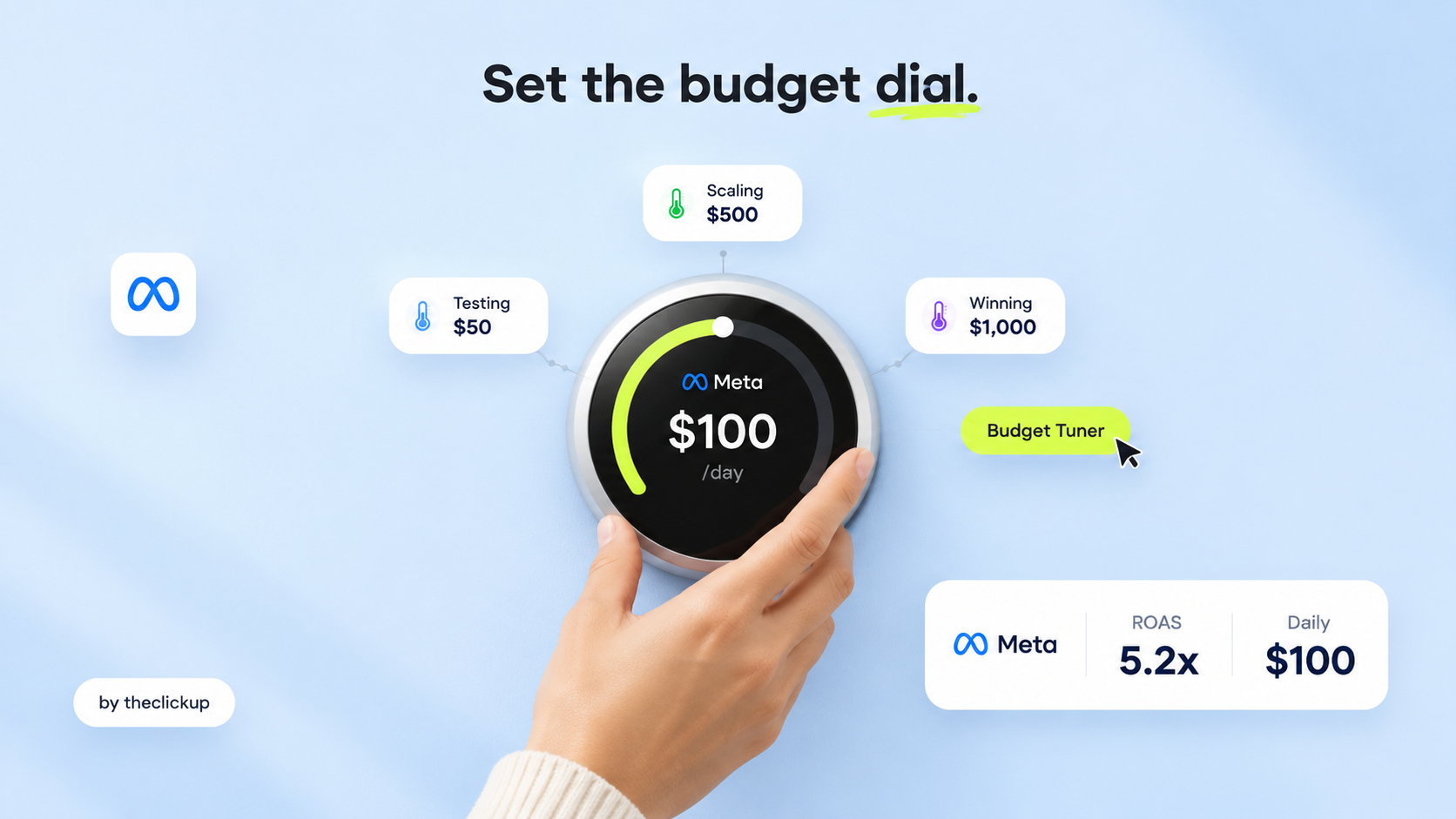
Start with $50-$100 a day for testing, and only scale when the numbers say so: a store that converts at 2% or better, with a cost per purchase that leaves room for profit, can raise the budget 20% at a time. A store that has never tested an ad should not spend $500 a day - it should spend $50 a day on five different ads and learn which one works. The budget is not the strategy. The test is the strategy, and the budget follows the test.
The numbers frame the decision. Meta Ads management typically costs $1,000-$5,000 a month, or 10-20% of ad spend, as reported by US agencies - on top of the ad spend itself. A store doing $10,000 a month in revenue might spend $1,500-$3,000 a month on ads; a store doing $100,000 a month might spend $15,000-$30,000. Our guide to how much Meta Ads cost covers the full price picture, and the Meta Ads management cost guide covers the agency side - this guide covers the budget itself, and when to raise it.
How much to spend at each stage
| Store stage | Daily ad spend | What the budget buys |
| Testing (new store, no data) | $50-$100/day | Five ads, one product, one audience each - learn which ad works before spending more |
| Finding winners ($10K-$30K/mo revenue) | $100-$300/day | Two or three winning ads, one prospecting audience and one retargeting audience |
| Scaling ($30K-$100K/mo revenue) | $300-$1,000/day | Winners scaled 20% at a time, new creative every week, retargeting kept honest |
| Established ($100K+/mo revenue) | $1,000+/day | Multiple products, multiple audiences, creative tested weekly, budget moved to what works |
| Seasonal (Black Friday, holidays) | 2-3x the normal budget | Planned in advance, with creative ready - never a last-minute budget raise |
| Stuck (ads not converting) | Cut to $20-$50/day and fix the store | A budget raise never fixes a broken store - fix the page, then raise the spend |
Where the budget actually goes
Three buckets decide whether the spend works. Everything else is decoration.
1. Testing: the first 20% of the budget
Testing is the cheapest money a store spends, because it buys information. Five ads, one product, one audience each - a different hook, a different image, a different headline. After a week, one or two ads will be clearly better, and the rest get cut. A store that never tests spends its whole budget on the first ad it made, and the first ad is almost never the best one. Our creative testing guide for Shopify covers the test itself - what to test, how long to run it, and when to call a winner.
2. Prospecting: the biggest bucket, once the test is done
Prospecting finds new buyers - broad audiences, lookalikes, interest targeting - and it takes the biggest share of the budget once a winning ad exists, usually 60-70%. The mistake is spending it before the test: prospecting with an untested ad is paying Meta to show a bad ad to new people. Our guide to scaling a Shopify store with Meta Ads covers the scale-up itself - when to raise, how fast, and what breaks first.
3. Retargeting: the smallest bucket, the highest return
Retargeting shows ads to people who already visited the store - cart abandoners, product viewers, past buyers - and it converts best, so it takes the smallest share, usually 20-30%. The mistake is spending it on everyone: a buyer who purchased yesterday does not need the same ad as a buyer who abandoned a cart. Our retargeting guide for Shopify stores covers the audiences - who to show, who to exclude, and how often.
The three budget mistakes that burn money
Most wasted Meta Ads budget comes from three mistakes, and all three look like good decisions at the time:
Raising the budget on an ad that has not won yet. A budget raise never fixes a bad ad - it just shows the bad ad to more people, faster. Scale only the ad that has already won: a clear cost per purchase, a clear conversion rate, three days of stable numbers. Our guide to the 5 Meta Ads mistakes covers the full list - the budget mistake is number one on it.
Spending before the store is ready. An ad that sends buyers to a slow store, a confusing product page or a broken checkout burns money at the landing page, not at the ad. Fix the store first: speed, product page, checkout. Our speed optimisation guide covers the numbers a store should hit, and what a redesign costs covers the fix.
Judging the budget by the day, not the week. Meta Ads need time to learn - a single bad day means nothing, and a single good day means nothing either. Judge by the week: cost per purchase, conversion rate, and the trend. A store that kills an ad after one bad day kills the ad that would have won on day three.
A weekly budget routine that keeps the spend honest
Five checks, once a week, and the budget stays honest:
- What did each ad cost per purchase this week? Cut the ads above your target cost, keep the ones below it - and know your target cost before the week starts.
- Which ad is the winner, and is it still winning? A winner that stops winning gets its budget cut, not raised. Winners fade - new creative replaces them every week.
- Is the store converting? If the conversion rate dropped, the problem is the store, not the budget - check speed, product page and checkout before touching the spend.
- Where did the budget actually go? Testing, prospecting, retargeting - if testing got nothing this week, next week has no new winners to scale.
- What is the plan for next week? One new test, one winner to scale, one ad to cut. A budget without a plan is a budget that drifts up and results that drift down.
Run this routine every Monday. A store that checks its budget weekly spends less and sells more than a store that sets a budget once and forgets it.
Already spending and not sure it is working? Run the three mistakes in section 4 first - or ask us to audit the spend before you raise the budget.
The verdict: budget follows the test, not the other way round
How much should a Shopify store spend on Meta Ads in 2026? Start with $50-$100 a day, test five ads, scale only the winner 20% at a time, and judge by the week - not the day. Spend 20% on testing, 60-70% on prospecting once the test is done, and 20-30% on retargeting. Never raise the budget to fix a bad ad or a broken store. If you want help with the spend, Meta Ads vs Google Ads for Shopify stores covers where each dollar works harder, and the Meta Ads service covers the ads while the Shopify service covers the store the ads send buyers to - the two have to be built together. theclickup runs Meta Ads for US Shopify brands from Islamabad, Pakistan, alongside the stores the ads send buyers to.
FAQ
How much should a Shopify store spend on Meta Ads per day?
Start with $50-$100 a day for testing - five ads, one product, one audience each. Scale only when the numbers say so: a store converting at 2% or better can raise the budget 20% at a time. A store doing $10,000 a month in revenue might spend $1,500-$3,000 a month on ads.
What is a good Meta Ads budget for a new Shopify store?
A new store should spend $50-$100 a day on testing, not $500 a day on one ad. Learn which ad works first, then scale the winner. Meta Ads management typically costs $1,000-$5,000 a month, or 10-20% of ad spend, as reported by US agencies - on top of the ad spend itself.
How do I know when to increase my Meta Ads budget?
Raise the budget only on an ad that has already won: a clear cost per purchase, a clear conversion rate, and three days of stable numbers. Raise 20% at a time, never double it overnight - a sudden raise resets the learning and the results drop.
How much of my Meta Ads budget should go to retargeting?
Usually 20-30% of the budget, because retargeting converts best and needs the least spend. Prospecting takes 60-70% once a winning ad exists, and testing takes the first 20%. A store that spends everything on retargeting runs out of new buyers.
Read more

 advantage

 Book a call

Fill out the form
or brief with questions



 LinkedIn
 Instagram
Welcome to The ClickUp privacy notice.
The ClickUp respects your privacy and is committed to protecting your personal data. This privacy notice will inform you as to how we look after your personal data when you visit our website (regardless of where you visit it from) and other sites we own and operate. And tell you about your privacy rights and how the law protects you.
We may change the privacy policy from time to time to reflect changes to the products and services that we provide and how we process your personal data.
We will not share your information with any third party outside of our organization, other than as necessary to fulfil your request if any."
INFORMATION WE COLLECTWhen you visit our website, our servers may automatically log the standard data provided by your web browser. This data is considered “non-identifying information”, as it does not personally identify you on its own. It may include:
- Your computer’s Internet Protocol (IP) address;
- Your browser type and version;
- The pages you visit;
- The time and date of your visi;
- The time spent on each page;
We may ask for personal information, such as your name and email address. This data is considered “identifying information”, as it can personally identify you. We only request personal information relevant to providing you with a service, and only use it to help provide or improve this service.
We collect information by fair and lawful means, with your knowledge and consent. We also let you know why we’re collecting it and how it will be used. You are free to refuse our request for this information, with the understanding that we may be unable to provide you with some of your desired services without it.
We will only process personal data and communicate with you if:
1. You have given us consent to the processing of your personal data and communicating for one or more specific purposes i.e. requesting products or services from us, downloading material or information from our website or submitting a contact us form.
2. Performance of a contract
3. Where we have a legitimate interest for contacting you in relation to our products and services
DATA PROCESSING AND STORAGEWe only retain personal information for as long as necessary to provide a service, or to improve our services in future. While we retain this data, we will protect it within commercially acceptable means to prevent loss and theft, as well as unauthorised access, disclosure, copying, use or modification. That said, we advise that no method of electronic transmission or storage is 100% secure, and cannot guarantee absolute data security.
Rights and choices of individuals:
- See what data we have about you, if any;
- Change/correct any data we have about you;
- Have us delete any data we have about you;
- See what security measures we apply to your data;
- Express any concern you have about our use of your data;
You may opt out of any future contacts from us at any time. You can do the following at any time by contacting us via the email address given on our website: theclickup.com
Got questions or want to discuss a project?


